Your public booking page
The link customers use to book themselves, and what they see on it.
Every shop gets a public page at a link of its own. No account, no app — the customer opens it and books.
Finding and sharing the link
It is on the dashboard, under Your booking page, with a Copy link button and an Open button to see it as a customer does.
The link comes from your shop name, fixed when the shop was created. Renaming the shop does not change it, which means cards, stickers and bios you printed keep working.
Put it where people already look for you: your Instagram bio, your Google Business profile, a WhatsApp away message, a QR code by the mirror.
What the customer does
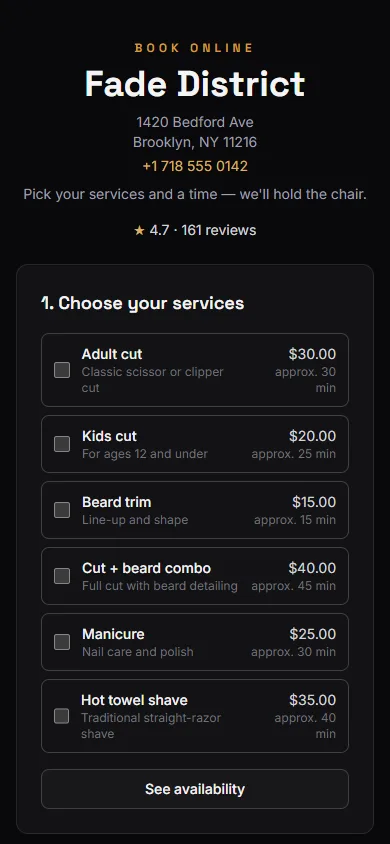
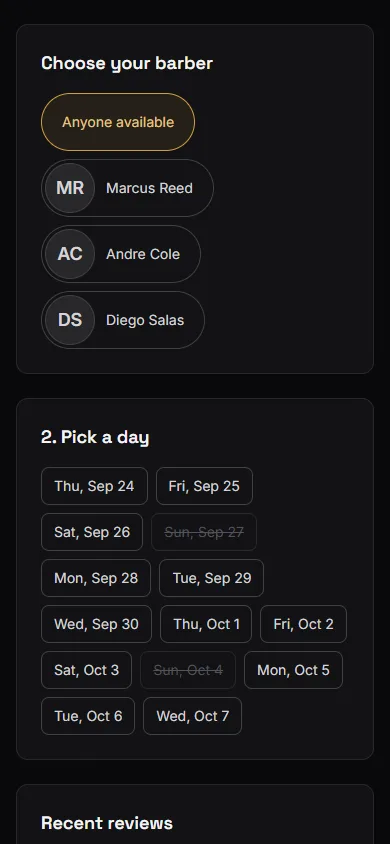
- Choose services. Names, durations and — if you allow it — prices.
- Choose a barber. Only on Barbershop, and only when there are at least two bookable barbers. Otherwise this step does not appear.
- Pick a day, then a time. Only genuinely free times are offered. See How available slots work.
- Leave their details. Name, and a phone or an email so you can reach them.
- Confirm.
The booking lands on your calendar immediately as a Scheduled visit, exactly like one you took by phone. If they left an email, they get a confirmation.
What shows up on the page
Your shop name and logo, your address and contact phone if you have saved them, and the services you have enabled.
Durations are shown as estimates — "approx. 30 min" — with a note that a visit may run a little shorter or longer. That is honest and it protects you: a customer promised exactly 30 minutes will notice at minute 34.
Optionally, your average rating and recent reviews. Off by default; see Customizing your booking page.
Returning customers
BarberNexa matches a booking to an existing customer by email first, then phone. A regular who books online is recognised rather than duplicated, and any contact detail you were missing gets filled in.
That works without accounts or passwords, which is why there are none.
What the page will not do
- It will not take payment. Money is handled at the counter.
- It will not book a closed day, or a time outside that weekday's hours.
- It will not book more than 60 days ahead.
- It will not let a customer cancel or reschedule themselves. They have to call you, and you cancel it from the calendar.
Before you share the link widely, open it yourself and book a test appointment. It takes a minute and shows you exactly what your customers see — including any service you forgot to disable. Cancel it afterwards from Jobs.