Barber availability and services
Which services a barber performs, which hours they work, and why leaving both alone is often right.
Both settings live on the member's page under Shop → Staff, and both are Barbershop features.
They exist to make your booking page accurate. Everything here feeds how available slots work.
Which services they perform
A list of checkboxes, one per service.
Leave every box unchecked and the barber performs every service. That is the default, and it is not a gap to fill in — it is the correct setting for most barbers.
Check some boxes and they are restricted to exactly those. Use it when it is genuinely true: one barber does beards and nobody else does, or the apprentice does not do the straight-razor shave yet.
Restrictions combine harshly. A customer booking a cut and a shave needs one barber who is assigned to both. If you split the shop so that Ana does cuts and Luis does shaves, nobody can be booked for both together, and that combination disappears from your booking page entirely.
Check your own booking page after assigning services. It is the fastest way to see what you just removed.
Their weekly schedule
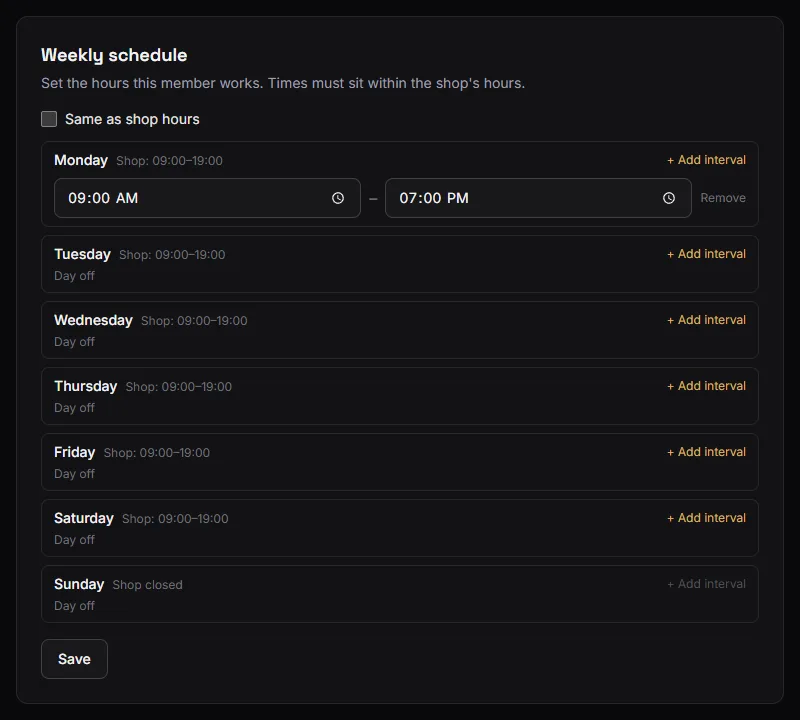
Custom hours is off by default, which means the barber works the shop's hours.
Turn it on and you set intervals per weekday. A barber can have several intervals in one day — 10:00–12:30 and 15:00–17:00 for someone who takes a long lunch.
The rules:
- Intervals must sit inside the shop's hours for that day. Each day in the editor shows the shop's hours for that day ("Shop: 09:00–19:00", or "Shop closed"), Add interval starts from them, and anything outside them is flagged before you save. Staff can narrow the shop's day, never widen it. To give somebody a later Thursday, extend the shop's Thursday first, in Settings → Weekly hours.
- Intervals cannot overlap each other.
- A custom-schedule day with no intervals is a day off. This is the part that surprises people: switching custom hours on and filling in only Tuesday and Wednesday means that barber is off the other five days, and their slots vanish from the booking page.
The default is not laziness
A barber with no service assignments and no custom schedule is fully available for everything the shop is open for. For a team that all does the same work and keeps the same hours, that is exactly right, and every restriction you add can only remove slots.
Configure the exceptions. Leave the rest alone.
Photos
Also on this page. Shown next to the barber's name when a customer chooses who cuts their hair, so it is worth having a real one.
A member can set their own from My profile; a manager can set anyone's from here. Without a photo, the customer sees the barber's initials.
Checking your work
Open your public booking page and try to book:
- each service on its own,
- the two-service combination you sell most,
- and each named barber.
Anything that shows no times is a restriction doing something you did not intend. Five minutes here is worth more than any amount of reading.