Opening hours and time zone
Your weekly hours drive the booking page, the calendar and staff schedules.
Shop → Settings → Weekly hours. One opening time and one closing time per weekday, or Closed.
New shops default to 09:00–19:00 every day. If that is not you, this is the first thing worth fixing — it is wrong on your public booking page too.
The rules
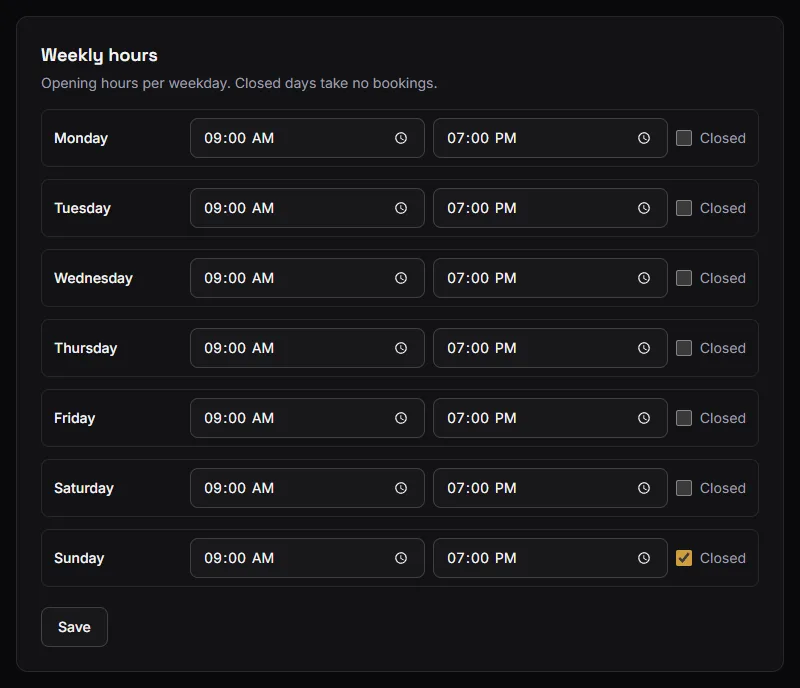
- One interval per day. There is no split shift: a shop that closes 13:00–15:00 for lunch sets 09:00–19:00 and relies on the calendar for the rest, or uses per-barber schedules to carve out the break.
- Opening must be before closing. No hours crossing midnight.
- At least one day open. Closing all seven is rejected — it would mean no bookings are possible at all.
What your hours control
The booking page. A closed day offers nothing. An open day offers 30-minute starts from opening, and a visit that would run past closing is not offered. See How available slots work.
Appointments you book yourself. The time picker covers that weekday's hours. The start must be before closing; a long visit may run past it.
The calendar grid. The day and week views are drawn between your earliest opening and your latest closing across the week.
Staff schedules. A barber's custom hours must sit inside the shop's hours for that day. Staff can narrow the shop's hours, never widen them — so extending a barber's Thursday means extending the shop's Thursday first.
Closing a weekday does not cancel appointments already booked on it. Check the calendar for that day and cancel anything standing, or the customer will arrive at a closed shop.
Your time zone
Set once, from your browser, when you created the shop. It is not edited in Settings.
It is what makes the app agree with your counter:
- Turn numbers reset at your local midnight, not the server's.
- "Today" on the dashboard and the front desk means your today.
- Appointment times are your wall clock. A visit booked for 3pm is 3pm at your shop, whatever device it was booked from and wherever the customer was standing.
This matters most when you are away. Checking tomorrow's calendar from a different country shows your shop's day at your shop's times, not a converted version of it.
If your shop's time zone is wrong, everything time-shaped is wrong with it — turn numbers roll over at the wrong hour, and customers are offered times you are closed. It is not editable from Settings, so contact support if it needs correcting.
Seasonal and one-off changes
Weekly hours are a weekly pattern; there are no holiday dates or one-off closures.
For a single closed day, set that weekday to Closed, cancel anything already booked, and set it back afterwards. For a longer break, close the days and expect to reopen them by hand.