Managing your subscription
The billing summary, the Stripe portal, and who is allowed to change what.
Two different pages
Shop → Billing is the summary: your plan, your status, and your trial end or renewal date. Owners, managers and receptionists can see it.
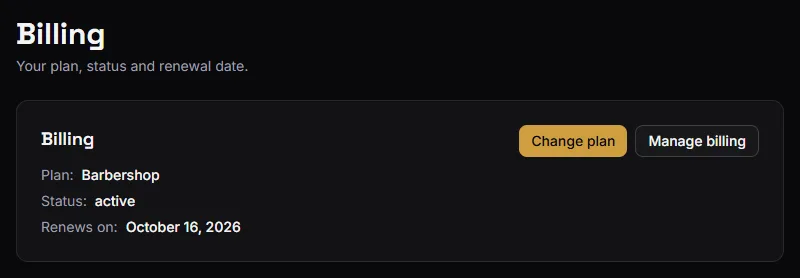
For the owner it also has two buttons, both opening the Stripe Customer Portal, where things actually change. Owner only.
- Change plan goes straight to the plan switcher, and comes back here when you are done. Leaving Barbershop with a team first tells you who would lose access, and when.
- Manage billing opens the portal's home — payment method, invoices, cancellation, and a scheduled plan change if there is one.
That split is deliberate. Anyone who might need to know whether the subscription is healthy can look; only the owner can hand out control of the card.
A manager who needs to change the plan has to ask the owner. There is no way around it inside the app, and the billing page says so.
What the portal does
Run by Stripe, opened from the button, and it covers:
- Update the payment method — a new card, or a replacement for an expiring one.
- Change plan between Studio and Barbershop. Upgrades apply at once, prorated; downgrades are scheduled for the end of the paid period, and show as a pending change on the billing page and the dashboard until then. See Plans and pricing.
- Cancel the subscription.
- Download invoices and receipts for your accounting.
Changes made there flow back into BarberNexa within seconds. Stripe is the source of truth for billing; the app follows it rather than keeping its own opinion.
What the statuses mean
| Status | What is happening |
|---|---|
| Free trial | Inside the 14 days. Full access, nothing charged yet. |
| Active | Paid and current. |
| Past due | A payment failed. You keep access for a short grace period. |
| Canceled | Ended. No access until you subscribe again. |
| Unpaid / Paused | No access. Sort it out in the portal. |
| Incomplete | Checkout was started but never finished. |
When a payment fails
The subscription goes Past due and a banner appears in the app asking you to update your payment method.
You keep full access for 7 days from the moment it first failed. Stripe retries in that window, and a successful retry clears it with nothing lost.
After 7 days, access stops and the shop lands on the paywall.
That grace period exists so an expired card does not close your shop on a Saturday. Do not treat it as a week of free time — update the card when you see the banner.
If access has stopped
You land on a page saying the subscription is needed, with the current status.
- The owner sees buttons to subscribe again to Studio or Barbershop, or to open the portal.
- Everybody else is told to ask the owner.
No data is lost while a subscription is lapsed. Your visits, customers, services, staff and history are all exactly where you left them, and they come back the moment billing is healthy.
Cancelling
From the portal. Access runs to the end of the period you already paid for.
After that the shop is behind the paywall. Nothing is deleted, and subscribing again restores access to everything.