Book an appointment
Schedule a future visit from a phone call or at the counter.
When someone calls, or asks for next Tuesday on their way out, use Appointments → New appointment.
Filling it in
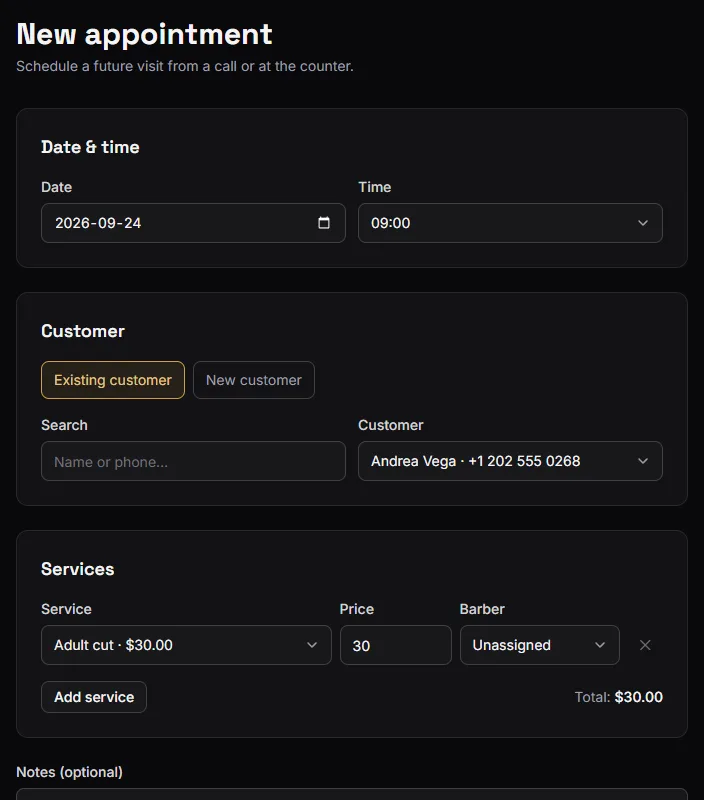
Customer. Search for an existing one, or type a new name and phone. Unlike a walk-in, an appointment always belongs to a customer — there is somebody to expect.
Email (for confirmation). Optional, and worth asking for. With an email the customer gets a confirmation right away, and a rating request after the visit is completed.
Date and time. The time list is a 30-minute grid across that weekday's opening hours. Times already full are shown as booked and cannot be picked; times that have passed are greyed out.
Services. Same as the front desk — one line each, with its own price and, on Barbershop, its own barber.
Notes. Anything the barber should know before the customer sits down.
Press Schedule appointment. From the confirmation you can go to the calendar or book another.
The limits
- Up to 90 days ahead. Far enough for a "same time next quarter" regular.
- Inside that weekday's opening hours. The start has to be before closing — a long visit is allowed to run past it.
- Not on a closed day, and not in the past.
If the day is closed or outside hours you get an error. Change the hours in Settings if the shop really is open then; see Opening hours and time zone.
Booking by phone vs. booking online
These are not the same rules, on purpose.
Your customers, on the public booking page, only ever see times a suitable barber is genuinely free — their own weekly schedule and the services they perform are both taken into account. How available slots work explains it.
You, booking from inside the app, get a looser check: a time is offered unless the shop already has as many overlapping appointments as it has active members. There is no per-barber schedule check here.
That is deliberate. You are the one on the phone with the customer, and you know the things the app does not — that the 4pm is a quick fringe trim, that somebody is staying late on Thursday. The public page is conservative because nobody is there to judge; the internal form trusts you.
The consequence: you can double-book yourself from the internal form, and sometimes you will want to. The calendar shows you the overlap; nothing stops you.
What happens next
The visit sits on the calendar as Scheduled with no turn number — it has not happened yet.
When the customer arrives, check them in. That is what assigns the number and puts them in the day's queue. See Managing the schedule.